What to look out for when preparing a CV
From passing ATS filters to proper formatting, education, and work experience sections; everything you need to know when building your CV.
A well-prepared CV is perhaps the most critical part of looking for a job. No matter how qualified you are, if your CV does not tell your story clearly, you will not even get invited to an interview. In this guide, I want to share the key points I learned from applying to hundreds of jobs, taking courses, and talking with dozens of recruiters and HR professionals.
Header and contact information
At the very top of your CV, there should be a clear header: your full name, phone number, email address, your city/country (a full home address is not necessary), and links to your LinkedIn, GitHub, or portfolio if applicable. This information must be easy to find, because it is the first place HR looks when they want to contact you.
If you are applying for software roles, definitely include your GitHub profile. If you work in design or a visual field, a portfolio link is just as important. Make sure your email address is clean and professional; avoid old nicknames. Similarly, clean up your profile URLs: use a clean custom link like linkedin.com/in/john-doe instead of random numbers. You can check how to customize your LinkedIn URL on LinkedIn Help.
I recommend avoiding decorative icons next to your contact info. While a small phone or email icon might look nice, some ATS parsers can misread them. Write the text cleanly. I also prefer non-clickable or plain-text links; they render consistently and keep ATS parsing clean.
You need a CV that passes ATS filters
First, what is an ATS? It stands for Applicant Tracking System. It is the software companies use to collect, scan, and filter job applications automatically. Before any human sees your CV, the system converts your PDF into plain text and applies search filters. You need a CV that converts cleanly into text and contains the right keywords for the role.
To avoid text conversion issues, do not use complex graphic design tools with multi-layer text boxes. Standard formats created in Microsoft Word or LaTeX work much better. When exported directly to PDF from Word or LaTeX, ATS software reads the structure easily.
Second, you need to match the job requirements. When a role asks for specific skills (such as SQL or Excel), the recruiter often searches for those exact keywords in the ATS. If the job requires Excel and your CV never mentions the word "Excel", you will likely get filtered out before a person reviews your profile.
To manage this easily, keep a master "base CV" that you update regularly. You can quickly adapt it for specific job postings by highlighting the most relevant keywords.
Key points for clean formatting:
- Consistent layout: Keep font sizes, line spacing, and margins uniform throughout the document. Do not use 13 pt in one section and 14 pt in another. Using a well-structured clean template is the easiest way.
- Photos: If you include a photo, use only one clear headshot. Extra icons or graphic illustrations can confuse automated systems into saving an icon as your profile photo.
If you need a reliable starting point, you can look at Microsoft's ATS-friendly resume templates.
Where should each section go?
Should Education or Experience come first? If you are a recent graduate, your education should usually appear at the top. As you gain more professional experience, move your work experience to the top.
Chronology: Always use reverse chronological order, putting your most recent role or degree first.
Summary section: My recommendation is to keep it to 2–3 short sentences explaining who you are and your primary focus. Do not repeat your entire work history; use it as a brief snapshot. If your past experience already matches the target role directly, a summary is optional. But if you are changing fields (for example, moving from architecture to product design), a summary is a great way to explain your transition and connect your transferable skills.
A standard layout order:
- Header & Contact Information
- Summary (optional)
- Experience or Education (whichever is stronger)
- Projects
- Skills
- Languages & Certifications
How to structure the Education section
Your education section should include your university, degree, department, and graduation year (or expected graduation year). Adding your GPA is optional; if it is strong (usually 3.0/4.0 or above), feel free to include it.
A poor example:
I studied at MIT and graduated from the mechanical engineering department.
A standard clean format:
Massachusetts Institute of Technology, B.S. in Mechanical Engineering — 2021–2026
If you are a student or recent graduate, you can list relevant coursework, capstone projects, or academic honors right below your degree. Once you have a few years of full-time experience, remove the coursework details and keep only the school, degree, and dates.
How to write effective bullet points for experience
Let's begin with a fitting quote:
"Perfection is achieved, not when there is nothing more to add, but when there is nothing left to take away." — Antoine de Saint-Exupéry
Instead of writing 3-line paragraphs describing daily tasks, think: "How can I say this in the shortest, most impactful way?" A strong bullet point answers three questions: What did you do? Which tools or methods did you use? What was the result?
Start every bullet point with a strong action verb (e.g., Developed, Managed, Automated, Reduced instead of Responsible for or Helped with).
Include metrics and numbers whenever possible:
- Automated manual report generation, reducing processing time by 70%.
- Managed a cross-functional team of 4 engineers.
- Created 15+ production-ready CAD models.
Numbers catch the reader's eye and show that you focus on tangible impact. You do not need numbers on every single bullet, but include them wherever you can measure your contribution.
Three frameworks for writing bullet points: STAR, XYZ, and CAR
If you are wondering how to turn your work into clean bullet points, three widely accepted frameworks can help:
1. STAR (Situation, Task, Action, Result) The classic framework for both interviews and CVs:
- Situation: Customer support response times were exceeding the 15-minute SLA target.
- Task: Tasked with lowering wait times and organizing support workflows.
- Action: Built an internal knowledge base and canned response library for the top 40 frequent queries.
- Result: Decreased average customer response time by 35% within 3 weeks.
Single-line CV bullet:
Built an internal knowledge base covering 40+ common queries, reducing average response time by 35%.
2. The XYZ Formula (Google's standard) Google recruiters recommend the formula: "Accomplished [X], as measured by [Y], by doing [Z]."
- X (Result): Decreased checkout drop-off rate on the e-commerce platform,
- Y (Metric): Increasing payment conversion from 2.1% to 3.4%,
- Z (Action): By integrating one-click checkout and automated address lookup.
Single-line CV bullet:
Increased checkout conversion from 2.1% to 3.4% by integrating one-click payment and address autocomplete.
3. CAR (Challenge, Action, Result) A streamlined framework ideal for operational and problem-solving roles:
- Challenge: Manual inventory tracking was causing weekly counting discrepancies and shipping delays.
- Action: Created an automated Excel tracking sheet with barcode scanner integration.
- Result: Reduced order fulfillment time by 2 days and eliminated counting errors.
Single-line CV bullet:
Developed a barcode-enabled inventory tracking tool, cutting fulfillment time by 2 days and eliminating counting errors.
In summary: Whether you use STAR, XYZ, or CAR, aim for the same core: What you did + How you did it + The measurable outcome.
Good vs. Bad Examples
A weak bullet point:
Worked on website development with team members and contributed to the project.
A strong, specific bullet point:
Built the checkout and payment module using React and Node.js, improving page load speed by 30%.
Marketing example:
Weak: Managed social media accounts and assisted with campaigns.
Strong: Managed Instagram and TikTok accounts, planned 5 monthly content campaigns, and grew followers by 40% in 6 months.
Projects section
If you are a student, recent graduate, or self-taught professional, personal and academic projects can make a big difference. A university capstone project, a deployed web app, or an open-source contribution proves your practical abilities even before you have full-time experience.
Follow the same writing principles: describe the goal, the tools used, and the result. Whenever possible, provide a link to the live demo or GitHub repository.
Keep it concise and tailored
Every experience is valuable, but a 2-month part-time cashier job does not help when applying for a UI design position. Keep your CV focused on the target role.
The same applies to your Skills section. Listing 30 different programming languages and tools makes it look like you only know each one on a surface level. Focus on the tools and technologies you genuinely know and that match the job description.
1 page or 2 pages?
Most recruiters prefer a single page for candidates with less than 5–7 years of experience. A tight 1-page CV looks focused and leaves interesting discussion points for the interview.
If you have 8+ years of relevant experience, a 2-page CV is acceptable. However, exceeding 2 pages is almost always a mistake. Edit ruthlessly to keep your most impactful achievements front and center.
Languages section
When listing languages, use standard proficiency terms (such as CEFR levels A1–C2 or Native / Fluent / Professional Working Proficiency / Intermediate) rather than vague terms like "Good English".
- English (C1 / Full Professional Proficiency)
- German (A2 / Elementary)
Certificates and courses
Only include certificates and online courses if they are directly relevant to the target job. List the certificate name, issuing institution, and completion year. You do not need lengthy course descriptions.
The photo question
Including a photo depends heavily on the country and industry. In the US, UK, and Canada, photos are generally omitted to prevent bias. In European and other markets, practices vary.
A 2024 field experiment published in the Journal of Economic Behavior & Organization sent 3,155 fake CVs to real job openings in Spain and showed that physical appearance on resume photos directly influenced callback rates across different industries and genders.
Because photos introduce uncontrollable subjective factors, omitting them is usually safer unless the specific local market or role explicitly asks for one. If you do include a photo, use a simple, professional headshot with no decorative graphics.
File name and proofreading
Before sending your CV, proofread it multiple times to catch any grammar or spelling mistakes. A careless typo in the first sentence can create a negative impression.
Finally, name your file cleanly: use FirstName_LastName_CV.pdf instead of cv_final_draft_v3.pdf. This makes it easy for the recruiter to find your file in their downloads folder.
Sample CV Templates (English & Turkish)
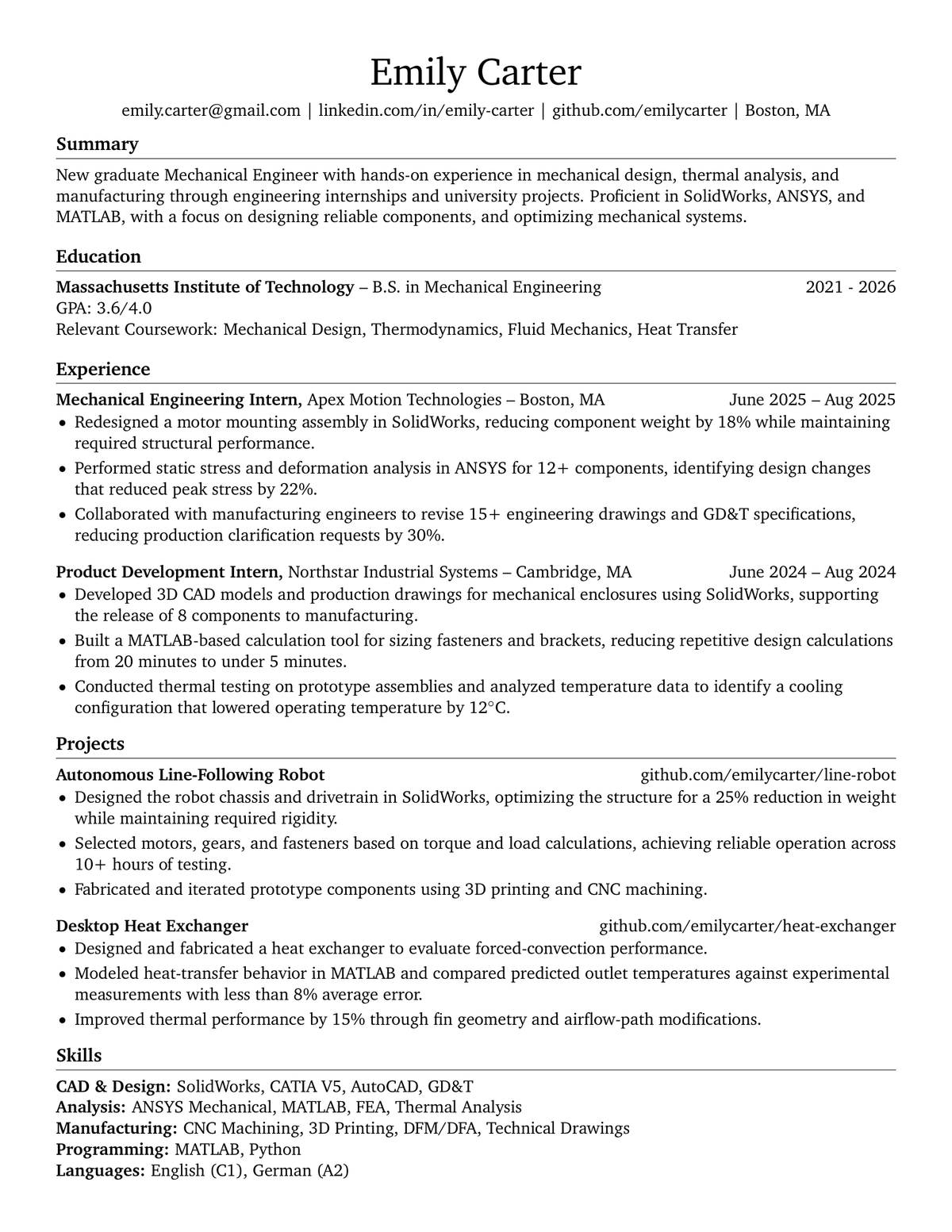
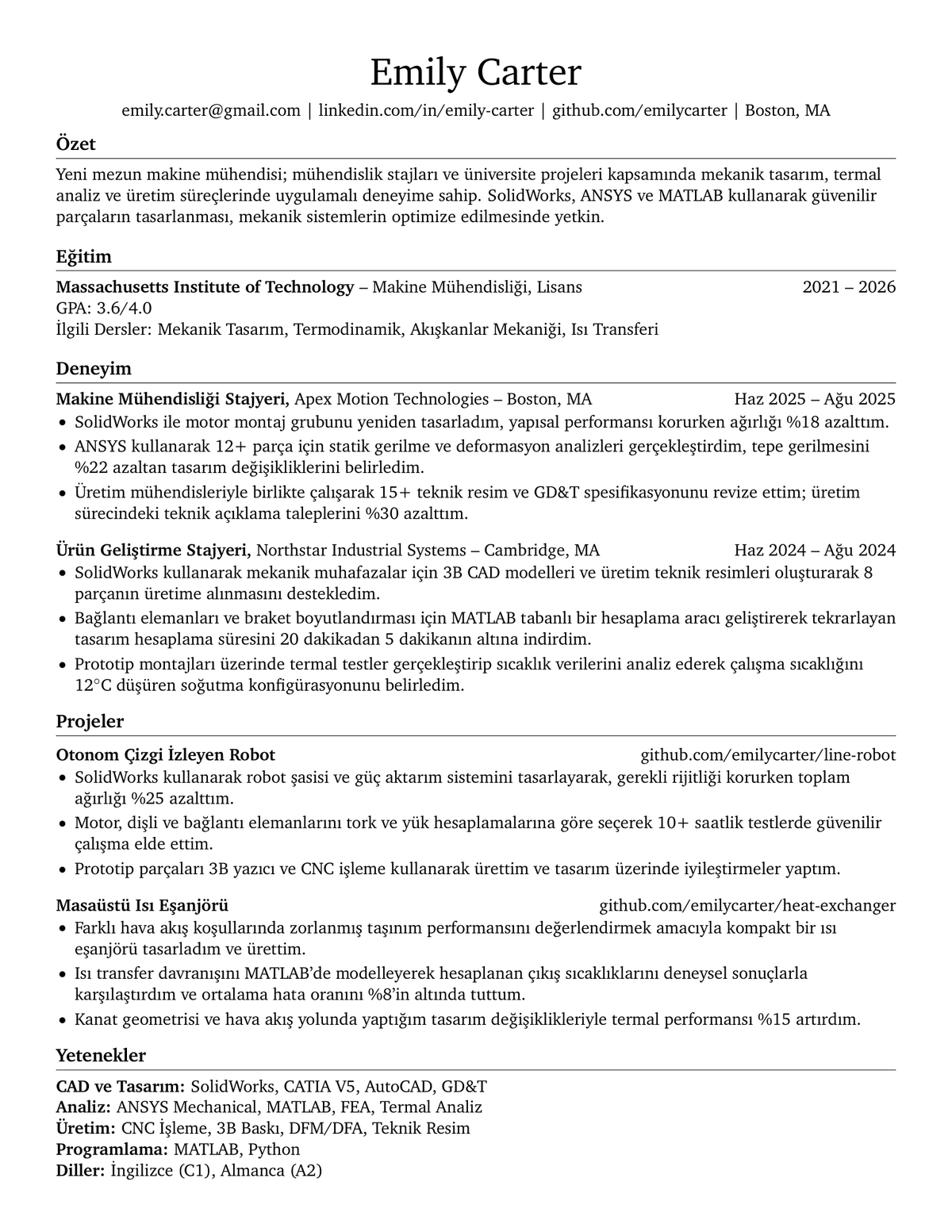
To illustrate these principles in practice, here are two sample CV templates in English and Turkish:
These templates do not claim to be the only "perfect" format, as every field and career level has its own nuances. However, they provide a balanced reference for ATS readability, reverse-chronological structure, action verbs, and clean single-page formatting.
English Sample CV
Turkish Sample CV
I hope this guide helps you build a clean and effective CV. In the next post, we will look at practical strategies for finding and landing jobs!